

Now is a GRAND time to enroll in eDocuments! These online documents are digital versions of the paper statements, tax documents, and notices that are typically sent in the mail. With Grand Savings Bank eDocuments, you can view, download, save, and print documents all within Online Banking.
Here’s how to enroll:
1) Log into your online banking account or the GSB app.
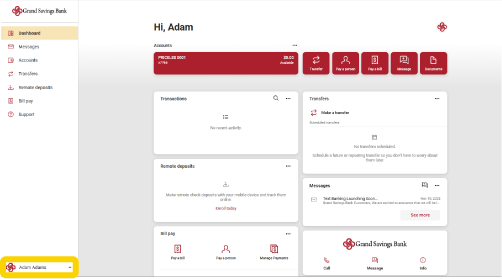
2) Choose profile in the bottom left corner.
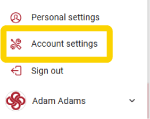
3) Select “Account Settings.”
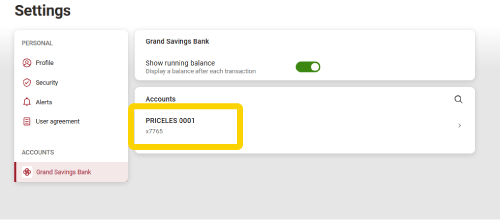
4) Choose one of the accounts that show up.
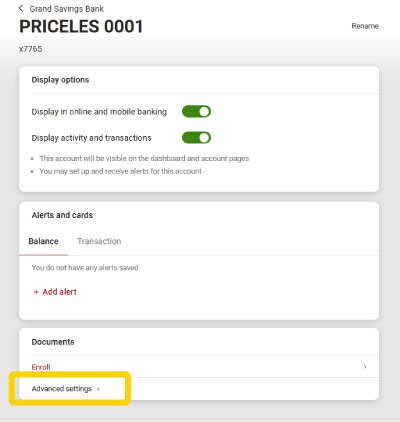
5) At the bottom under documents, select “Advanced Settings” at the bottom.
6) At the top, select the “Sign Up/Changes” tab.

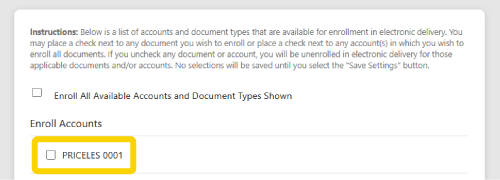
7) Select the account or accounts you want to enroll in electronic statements.
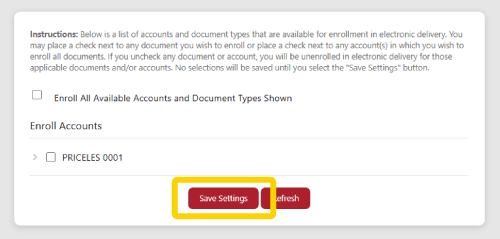
8) Click “Save Settings.”
If you have any questions, give us a call at 1-800-460-2070.
We will send you an email each time an eDocument is available for viewing online. Lastly, if there are changes to account terms and conditions or other legal notifications, they will also be presented online, along with your account statements. You can resume the delivery of your paper statements at any time.
eDocument Disclosure and Consent
Click here to view a copy of the eDocuments disclosure.
I understand that I will receive a notice monthly when my eDocuments become available. I will have access to it for 18 months from the date of notification.
I understand that I have the right to withdraw this consent, but if I do, participation in the Grand Rewards Checking account will be immediately terminated and any unpaid accrued interest forfeited. To withdraw consent for eDocuments, notification must be presented in writing to us at Grand Savings Bank, PO Box, 451809, Grove, OK 74345, or your may stop by any branch and sign an electronic statement withdrawal of consent form.